Start a project info@oneewaee.com

Kathmandu, Nepal

CLIENT RELATIONSHIPS & BUSINESS WORKFLOWS

OneeCRMBusiness implementations

Client records, team workflows and business operations.

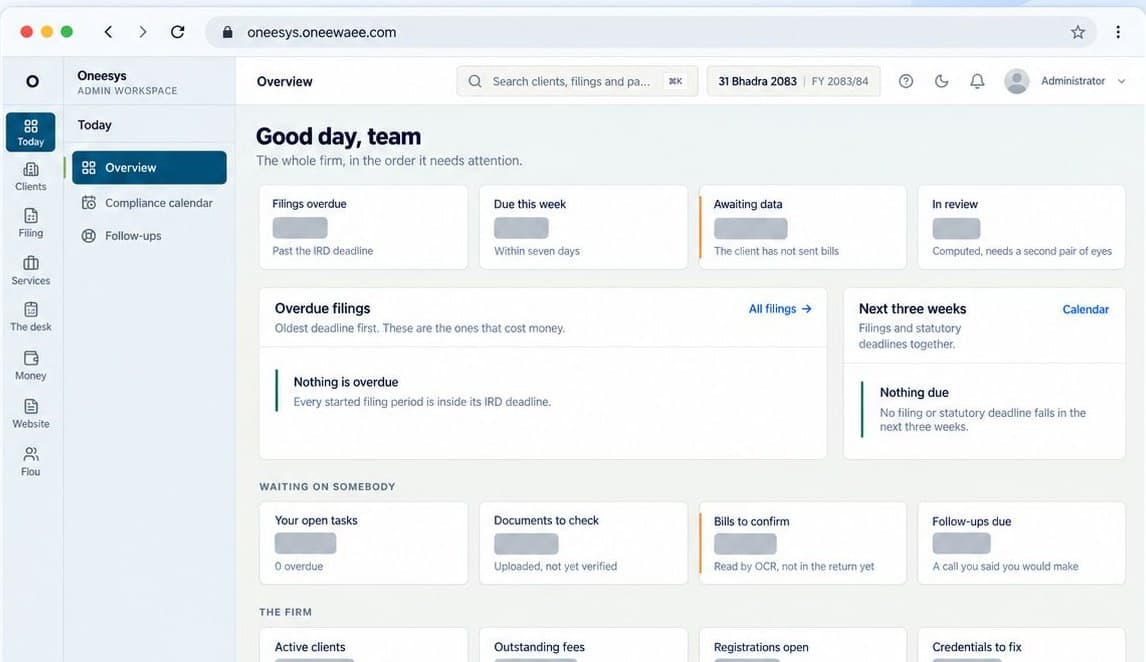
OneeCRM powers the day-to-day work that client-based businesses rely on. It brings relationships, assigned work, requested documents and service delivery into a connected operating record. The Oneewaee product family includes Oneesys as a public platform for these capabilities and implementations tailored to businesses such as N Ghimire and Associates.

Masked Oneesys operational dashboard illustrating the CRM product family's connected client and compliance workflows.
Built for

Professional service businesses

Accounting and consulting teams

Firms coordinating clients and deadlines

Businesses with document-led service delivery

PRODUCT FEATURES

What you can do with the system.

Explore the features of OneeCRM and the work they help you do.

01

Clients and companies

Manage the people, companies, addresses and responsibilities behind a client relationship, with searchable records and structured lifecycle stages.

  • Individual and company records
  • Linked contacts and addresses
  • Client onboarding and access claims
  • Assigned responsibility and follow-ups
02

Contracts and services

Keep the agreement connected to delivery. Service contracts and agreed fees can shape engagements, billing schedules and the work expected from the team.

  • Service catalogues and agreed fees
  • Contracts and line-item records
  • Billing schedules and invoicing
  • Delivery and payment tracking
03

Engagement delivery

Move work through explicit stages with accountable owners. Document requirements and approvals are attached to the job rather than held in a separate message trail.

  • Templates, stages and owned tasks
  • Document checklists and client requests
  • Draft, review and approval states
  • Deliverables and progress visibility
04

Document operations

Collect, categorize and review client documents through a controlled workflow. Keep the working file connected to the client and engagement it belongs to.

  • Secure upload and categorized document records
  • Bulk document handling
  • Review and verification steps
  • Versioned library and permission-scoped access
05

Compliance visibility

Bring filing status, deadline-driven work and activity into one view so the team can see what needs attention before the next handoff.

  • Deadline and filing-status monitoring
  • Register and period workflows
  • Review and filing references
  • Audit and activity histories
06

Customer workspace

Let clients view their own work, respond to requests, provide documents and follow conversations. A customer sees the parts of the process relevant to them.

  • Company-scoped client records
  • Outstanding requests and document uploads
  • Work progress, reports and invoices
  • Customer messages and support
07

Staff and money workflows

The implementation includes operating modules around the core relationship record, with access adapted to staff responsibilities.

  • Tasks, permissions and staff directory
  • Billing, expenses and payment records
  • Payroll and attendance workflows
  • Reports and management views
08

Mobile and real-time work

The Flutter implementation extends the operational model to mobile screens for clients, documents, messages, tasks and other supported modules.

  • Client and task workspaces
  • Document requests and review screens
  • Conversations, notifications and call interfaces
  • Shared backend and role-aware workflows

BEHIND THE INTERFACE

How the system works.

01

A business record with continuity

Relationships, work, documents and communication are connected. The team can move from a client to an engagement and its supporting material without rebuilding the context in another tool.

02

Permissions across the whole workflow

Different people need different parts of the system. Client association, staff capabilities, document restrictions and recorded sensitive actions help keep operational access aligned with responsibility.

03

Customer-specific implementation

The N Ghimire and Associates implementation reflects a professional practice's actual client and delivery workflows. Configuration and integrations should be agreed against each organization's requirements.

04

Connected web and mobile engineering

The Next.js dashboard and Flutter application use the same operational backend. Mobile modules exist in the implementation; public app distribution and each customer's enabled modules are confirmed separately.

FROM SETUP TO EVERYDAY USE

Getting started with your team.

01

Map the business

Identify client types, services, contracts, document requirements, approval roles and recurring deadlines.

02

Establish one operating record

Configure the client register, workflows, portal access, permissions and the modules the business will use.

03

Run and improve delivery

Use task and document states to coordinate work, keep clients informed and review activity as the business grows.

IMPORTANT DETAILS

Availability and important details.

  • OneeCRM and Oneesys belong to the same Oneewaee business-software family. The supplied public product address is oneesys.oneewaee.com.
  • Modules and integrations depend on the business implementation; this page does not claim that every customer enables every module.
  • The mobile source demonstrates implementation work. Ask our team about actual release and distribution availability.

STRAIGHT ANSWERS

Common questions.

How is OneeCRM related to Oneesys?

OneeCRM describes the client-management and operating capabilities used in business implementations. Oneesys presents a configurable public platform combining those workflows, AI-assisted document processing and website content management.

Which customer implementation can you discuss?

N Ghimire and Associates is a named implementation in the company's product work. Contact Oneewaee for a walkthrough appropriate to your organization.

Can it connect to our existing processes?

We review records, APIs, roles and workflows before agreeing an import or integration. The scope depends on what your current systems expose and the outcome you need.

EXPLORE THE IMPLEMENTATION

Explore the product and its implementation.

Capabilities are described from the product documentation and implementation work. Availability and enabled modules depend on your setup.

NEXT STEP

Talk to us about OneeCRM.

Tell us about your team and the work you want to improve. We can discuss how OneeCRM would be set up, which parts fit your organization and what a sensible first step looks like.

THE ONEEWAEE PRODUCT FAMILY

Keep exploring.