Start a project info@oneewaee.com

Kathmandu, Nepal

AI-ASSISTED BUSINESS OPERATIONS & CMS

OneesysConfigurable platform

CRM, content management and AI-assisted business operations.

Oneesys connects the public-facing side of a business to the work behind it. It is configured for accounting, audit, tax and consulting firms, and can be reshaped through fields, service catalogues, engagement templates and access settings. AI-assisted bill scanning, document organization and a website content workspace help teams turn incoming information into reviewable, organized work.

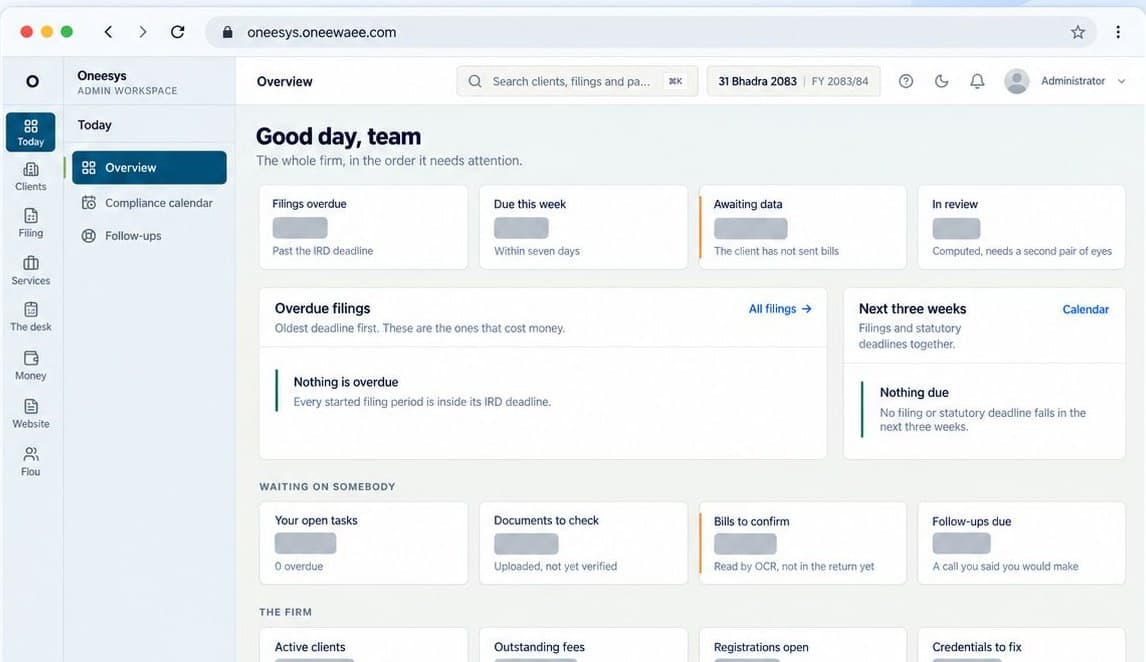
Actual Oneesys daily overview showing filing status and a compliance calendar. Customer information is hidden.
Built for

Accounting and audit firms

Tax and compliance practices

Business and professional consultancies

Organizations managing retained clients

PRODUCT FEATURES

What you can do with the system.

Explore the features of Oneesys and the work they help you do.

01

Client register

Keep the relationship and its business record together: contacts, addresses, purchased services, agreed fees, responsible staff and conversation history.

  • Prospect, onboarding, active and dormant stages
  • Custom fields, forms and saved filters
  • Services and agreed fees on the client record
  • Company access claims and responsible staff
02

AI-assisted document scanning

Photograph a bill or add a PDF. The system extracts candidate data and creates a draft for review, with arithmetic checks and confidence signals.

  • Sales and purchase bills and adjustment notes
  • Vendor/customer context and client matching
  • Literal local-calendar date handling
  • Field confidence, tax and total cross-checks
03

Engagements and client requests

A job checklist and the client's requested actions are part of the same record. An owner can be a colleague or the client, with the relevant action visible in their workspace.

  • Service-specific stages and editable templates
  • Owned steps and document upload requests
  • Approval and changes-requested steps
  • Progress based on completed work
04

Compliance and local calendars

Track deadline-driven work using the Nepali fiscal calendar. Filing periods, registers and computation support a qualified person's review and submission.

  • VAT and withholding registers and periods
  • Annual and instalment-based tax workflows
  • Statutory audit and registry compliance
  • Filing references and locked submitted periods
05

Document library and credential vault

Files are organized and linked to the records they support. Sensitive client logins are handled separately, with explicit permissions and a record of access.

  • Versioned, tagged and record-linked documents
  • Restricted folders and confidential-document access
  • Encrypted stored credentials
  • Named, reasoned and recorded credential reveals
06

Billing and firm operations

Connect work and agreed fees to the invoice, then keep the firm's own operating records close enough to review.

  • Invoices, receipts, reminders and payments
  • Expenses, budgets and reimbursements
  • Payroll and staff operating workflows
  • Management and category-based reporting
07

Website CMS

Manage public content from a workspace connected to the business, rather than a separate publishing island. Public pages, team profiles and posts can be maintained alongside client work.

  • Public page and website content management
  • Team profiles and publishing records
  • Branding and customer-facing content
  • Enquiries connected to business workflows
08

Conversations, portals and access

Clients see their own requests, work, invoices, documents and conversations. Team members receive capabilities suited to their responsibilities.

  • Client portal with one-time-code sign-in
  • One person linked to multiple companies
  • Client, team and inbound email threads
  • Per-person capabilities and audit activity

BEHIND THE INTERFACE

How the system works.

01

Configuration before rebuilding

Fields, forms, services, stages and module availability can be configured for the business. The platform's default accounting workflows are a starting point; organizations can use the CRM without enabling every statutory module.

02

AI creates a reviewable draft

A scanned number can affect a tax register or invoice. The scanning workflow exposes confidence and arithmetic checks and requires a person to confirm the draft before it becomes an operational posting.

03

Nepali dates are part of the data model

Bikram Sambat periods and fiscal schedules are treated as operating data. A date extracted from a document is checked against its literal text, helping avoid assumptions about a Gregorian year.

04

One record, different workspaces

Owner, team, client and public interfaces are views into a connected system. Access to actions, folders and sensitive records follows capabilities and scope instead of relying on the interface alone.

FROM SETUP TO EVERYDAY USE

Getting started with your team.

01

Configure the practice

Choose the modules, fields, service catalogue and roles that reflect the firm's work.

02

Connect records and delivery

Bring client records into the system, open engagements and collect documents and requests through the portal.

03

Review, complete and keep the record

Verify drafts, complete authorized workflow actions, bill delivered work and retain the relevant version and filing history.

IMPORTANT DETAILS

Availability and important details.

  • Oneesys prepares and tracks statutory work. It does not automatically file returns or provide tax, legal or accounting advice.
  • AI document extraction is an assistive workflow; a qualified person remains responsible for verification.
  • OneeCRM describes the client-management and operational capabilities behind business deployments; the public platform can be explored through the Oneesys website.

STRAIGHT ANSWERS

Common questions.

Is it only for accounting firms?

The default configuration fits accounting and compliance work, but client fields, services, templates and module availability can be adapted for other client-based organizations.

Does it include public website management?

Yes. The website content workspace manages public pages, team profiles and posts from a workspace connected to the firm's operations.

Can clients see another company's information?

Client workspaces and sensitive records follow company association and permissions. Specific access requirements should be reviewed during onboarding and configuration.

EXPLORE THE IMPLEMENTATION

Explore the product and its implementation.

Capabilities are described from the product documentation and implementation work. Availability and enabled modules depend on your setup.

NEXT STEP

Talk to us about Oneesys.

Tell us about your team and the work you want to improve. We can discuss how Oneesys would be set up, which parts fit your organization and what a sensible first step looks like.

THE ONEEWAEE PRODUCT FAMILY

Keep exploring.