Start a project info@oneewaee.com

Kathmandu, Nepal

RESEARCH & DEVELOPMENT

Research that makes our software more dependable.

We investigate real product problems: understanding a calculation, recovering saved work, maintaining a conversation or interpreting a map. Each area connects an engineering question to a practical improvement and the checks it needs.

Research moves from a real problem to an experiment, verification and an improved product.DefineA real requirementExperimentBuilt in isolationVerifyEvidence recordedImproveRelease and learnEvidence
Illustration of the research cycle. Evidence and limits are recorded on each pass.

FROM A PRODUCT PROBLEM TO A CHECKED CHANGE

Research starts with something people need the software to do.

What happens if a save is interrupted? Does an imported formula still mean the same thing? Can a colleague take over an AI conversation with its context intact?

We turn these questions into experiments, exercise the relevant parts of the system and record what is proven and what still needs validation.

Oneewaee’s applied research cycleDefine the problemA real product requirementBuild an experimentAn isolated prototypeVerify the behaviorEvidence from the systemImprove the productRelease and learn
An engineering process, guided by product problems and recorded checks.

OUR RESEARCH AREAS

Questions connected to working products.

Explore the customer benefit, investigation and verification methods. Open the implementation panel to read the details and the work that still needs validation.

OneeSheet

Make workbook calculations easier to trust

People should be able to understand a result and see which imported workbook features are supported.

The question we investigate

How can a workbook remain understandable when formulas, imported objects and connected data interact?

  1. Workbook inputFormulas & imported files
  2. Calculate & inspectDependencies & compatibility
  3. Understand the resultVisible support boundaries
How we check the work
  • Check formula results and their dependencies
  • Test calculations and the visible workbook together
  • Import and export files, inspecting unsupported features
Implementation and continuing work

Implementation work

OneeSheet combines a sparse C# workbook, cross-sheet dependency tracking, WebAssembly calculation and a canvas-rendered interface. The Compatibility Inspector distinguishes editable features from preserved or unsupported workbook content.

Continuing work and validation

We continue to work on calculation fidelity, bounded rendering, dynamic references and reusable analytical workflows. Independent Microsoft Excel comparison remains a validation objective.

Technical verification methods

  • Typed formula fixtures and dependency checks
  • Actual worker and visible-grid verification
  • XLSX round trips and compatibility inspection
Explore OneeSheet
A formula cell depends on other cells; the workbook reports which features are supported, preserved or unsupported.ABCResultDependencies are tracedfrom inputs to the resultSupportedPreservedUnsupportedCompatibility
Capability illustration of this research focus.

OneeSheet

Preserve the work that people save and review

An interruption or repeated action should not erase the distinction between an edit, a saved state and approved figures.

The question we investigate

Can an interrupted edit, repeated posting or changed formula be handled without losing what was acknowledged or reviewed?

  1. Edit or approveA recorded operation
  2. Preserve & recoverJournal & identity checks
  3. Compare the recordSaved & reviewed figures
How we check the work
  • Repeat actions and interrupt saves to check the result
  • Restart isolated systems and compare recovered work
  • Compare approved figures and check protected records
Implementation and continuing work

Implementation work

Our development includes ordered workbook authority, checksummed journals, reconnect identities, review states and preserved approval figures. Managed invoice and credit workflows connect reviewed snapshots to protected records.

Continuing work and validation

Recovery work needs evidence from both isolated tests and the deployed environment. Financial rules require professional validation; integrity hashes do not substitute for external digital signatures.

Technical verification methods

  • Duplicate-operation and failed-save scenarios
  • Abrupt-restart and isolated recovery checks
  • Approval comparison and protected-write checks
Explore OneeSheet
A saved edit is journalled; after an interruption the work is recovered and approved figures are preserved.EditJournalInterruptedRecoveredChecksummed journalThe same operation is not applied twiceApproved figures preservedReviewed values stay comparable to the record
Capability illustration of this research focus.

OneeAI & Oneesys

Make AI useful inside a business workflow

Answers and extracted information need relevant context, clear action boundaries and a path to human review.

The question we investigate

How does an assistant move from a plausible reply to a useful, controlled business interaction?

  1. Business informationKnowledge & documents
  2. Configured intelligenceRetrieval & workflow tools
  3. Useful next stepAnswer, review or handover
How we check the work
  • Test customer questions and team handover
  • Check answers against sources and documents
  • Exercise errors, waiting states and retry behavior
Implementation and continuing work

Implementation work

OneeAI connects approved knowledge, conversation continuity, configured tools and staff handover. Oneesys puts extracted document information into reviewable drafts with field confidence and arithmetic checks.

Continuing work and validation

We work on retrieval quality, context continuity, document interpretation and recoverable workflow states. Model output remains subject to the review and action boundaries of each implementation.

Technical verification methods

  • Customer-intent and handover scenarios
  • Source-aware answers and document checks
  • Review of failures, waiting states and retries
Explore OneeAI & Oneesys
A customer question is answered from approved business knowledge, or handed to a person with the context kept.Customer questionBusiness knowledgeApproved sources and toolsTeam membertakes overHandoverConversation kept
Capability illustration of this research focus.

OneeGIS

Help people interpret the map they are viewing

A location becomes more useful when its records, imagery sources and observation dates remain connected.

The question we investigate

How can imagery, plot records and observations stay connected as a user searches, selects and navigates?

  1. Plots & imageryGeographic sources
  2. Link the contextRecords & observation dates
  3. Explore and interpretSelection & layer behavior
How we check the work
  • Check that map selections open the matching records
  • Show imagery sources and observation dates
  • Test layers, navigation and phone layouts
Implementation and continuing work

Implementation work

OneeGIS powers Sakhejung Tea’s live map, combining MapLibre rendering, garden boundaries, a searchable register, imagery options, canopy context and 3D views.

Continuing work and validation

Our work explores spatial interaction, source and acquisition-date context, and adaptable data models. Observations are interpreted within their sources; a web map is not a certified boundary survey.

Technical verification methods

  • Record-to-geometry interaction checks
  • Source and observation-date presentation
  • Layer, camera and responsive map behavior
Explore OneeGIS
Map boundaries and imagery stay connected to the record and observations for a selected plot.Plot recordImageryPlotsObservations
Capability illustration of this research focus.

Oneemail

Keep communication useful across clients

Business mail and collaboration should fit the organization’s supported tools, sessions and access rules.

The question we investigate

How do business communication tools work together across protocols, organizations and devices?

  1. Mail & collaborationOrganization workspace
  2. Protocol integrationClient & sync behavior
  3. Connected workMigration & session checks
How we check the work
  • Check supported mail clients and synchronization
  • Test organization access and session boundaries
  • Exercise migration and interrupted connections
Implementation and continuing work

Implementation work

Oneemail brings domain mail, organization administration, collaboration and file workflows together. JMAP, compatible mail protocols and CalDAV/CardDAV connect different client and synchronization needs.

Continuing work and validation

We develop interoperability, session and access controls, migration workflows and recoverable collaboration. Enabled protocols and features depend on the service configuration and plan.

Technical verification methods

  • Protocol and client integration checks
  • Organization and session boundaries
  • Migration, synchronization and recovery scenarios
Explore Oneemail
A mail workspace connects to compatible clients through IMAP and SMTP, JMAP in the browser and calendar synchronization, with domain authentication alongside.Mail workspaceIMAP / SMTPJMAPCalDAV / CardDAVSPF · DKIM · DMARC
Capability illustration of this research focus.

OneeStream

Coordinate video processing and playback

A viewing experience depends on the processing jobs, packaged qualities and player working together.

The question we investigate

How does a source file become a reliable viewing experience under different playback conditions?

  1. Media sourceProcessing & encoding
  2. Packaged variantsManifests & access
  3. Playback behaviorQuality & resume checks
How we check the work
  • Check encoding jobs and their packaged video variants
  • Test automatic and manual quality selection
  • Check resume playback and the configured access model
Implementation and continuing work

Implementation work

OneeStream engineering connects processing jobs, FFmpeg GPU encoding, DASH/HLS packaging, protected delivery and adaptive playback, including Android viewing continuity.

Continuing work and validation

We explore pipeline coordination, quality variants and player behavior. Public distribution, capacity and content rights are confirmed separately for an actual deployment.

Technical verification methods

  • Encoding and manifest coordination
  • Adaptive and manual quality behavior
  • Resume playback and access-model checks
Explore OneeStream
A source video is encoded into several qualities, packaged for DASH and HLS and played with adaptive quality.SourceEncodePackagePlayerQuality ladder480p720p1080p
Capability illustration of this research focus.

HOW THE WORK PROGRESSES

Define. Experiment. Verify. Improve.

We use product requirements to guide the investigation, then record what the checks demonstrate and what remains uncertain.

01

Define the operating problem

Start with a concrete failure, workflow or data requirement from a product or customer implementation.

02

Build an isolated experiment

Use a prototype, fixture or disposable workbook to test the proposed behavior without changing customer records.

03

Exercise the actual system

Check the relevant calculation worker, interface, network boundary or storage path. Source inspection alone does not prove deployed behavior.

04

Record evidence and limits

Separate implemented capability, local verification, deployment checks and independent validation that is still needed.

05

Release and learn

Bring the verified change into the product’s release process and use operating feedback to guide the next investigation.

Implementation

Source and prototypes show how a capability is designed. That is useful engineering evidence, while actual behavior still needs to be exercised.

System verification

We check relevant workers, interfaces, storage paths and failure scenarios. Local results are recorded with their environment and limits.

Release and independent review

Production readiness depends on the deployment. Financial rules, external compatibility and specialist requirements may need separate professional or independent validation.

ONE EXAMPLE: ONEESHEET

Calculation, files and collaboration in one workspace.

OneeSheet brings a C# calculation model, WebAssembly worker, rendered grid and connected workbook state together. Our ongoing work examines formula dependencies, file fidelity, recovery and preserved financial review.

The public web workspace is available. Advanced implementation work and remaining validation are described on the product page; desktop packaging is currently paused.

Explore OneeSheet
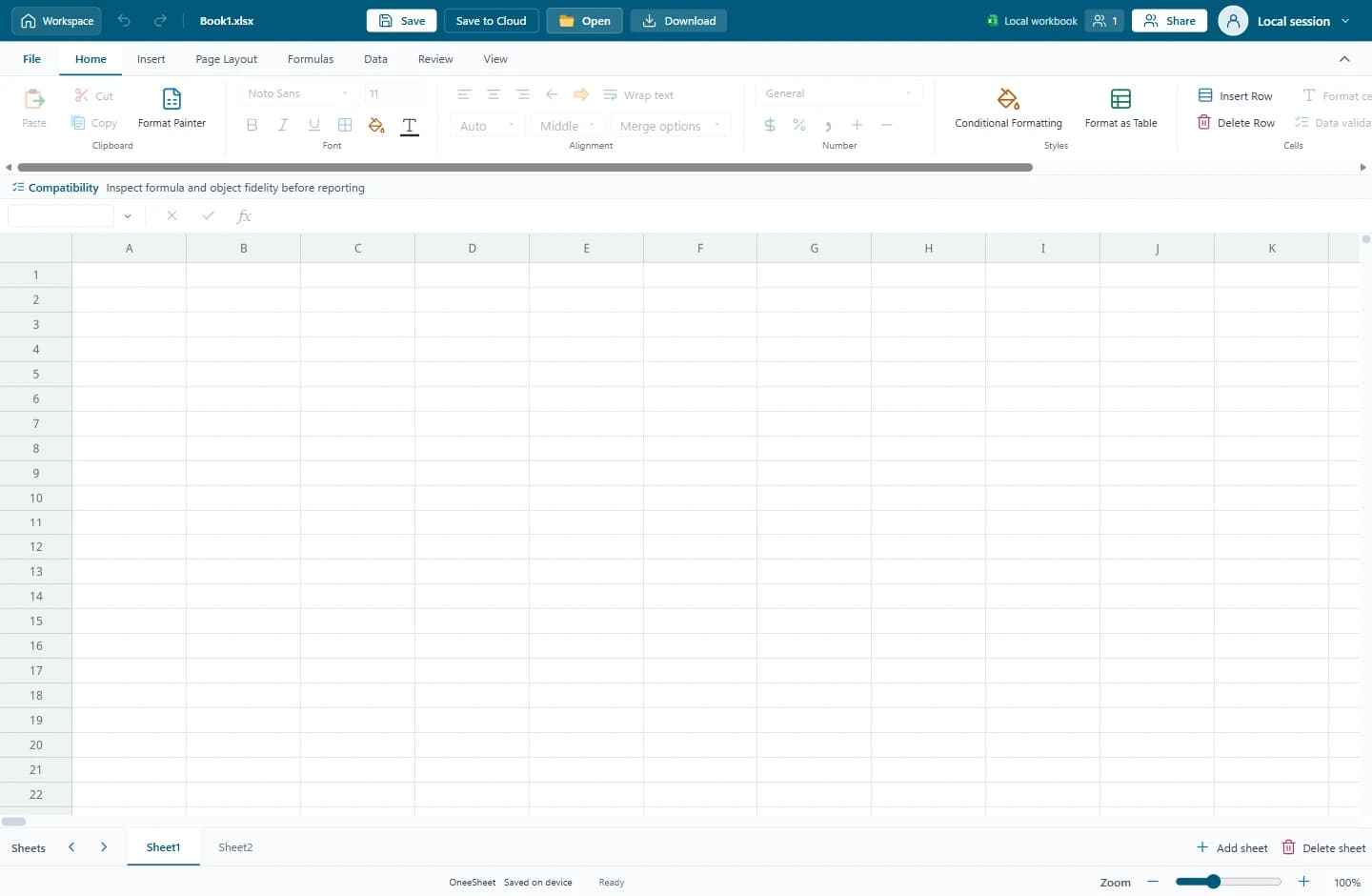
The actual OneeSheet public local editor displaying an empty workbook.
The public OneeSheet editor. This capture shows the workspace, rather than demonstrating every capability under investigation.

APPLIED RESEARCH CONVERSATIONS

Bring us a problem worth investigating.

Share your operating problem, the available information and the outcome you need. We can discuss whether a prototype, integration or deeper investigation is appropriate.

  • Analytical and spreadsheet workflows
  • Business-grounded AI and document processing
  • Spatial data and interactive maps
  • Dependable communication and operational systems
Discuss a research requirement