Start a project info@oneewaee.com

Kathmandu, Nepal

SPREADSHEETS, ANALYTICS & FINANCIAL WORKFLOWS

OneeSheetWeb workspace available

Spreadsheets, built around calculation and accountable work.

OneeSheet brings spreadsheet editing, calculations, data preparation and financial review into a connected workspace. Its sparse C# workbook engine runs through a browser WebAssembly worker, with a canvas-based grid and an authoritative collaboration server. The public web workspace supports sign-in and local editing. Oneewaee’s ongoing engineering extends the platform with durable recovery, reusable data refresh and reviewable business workflows.

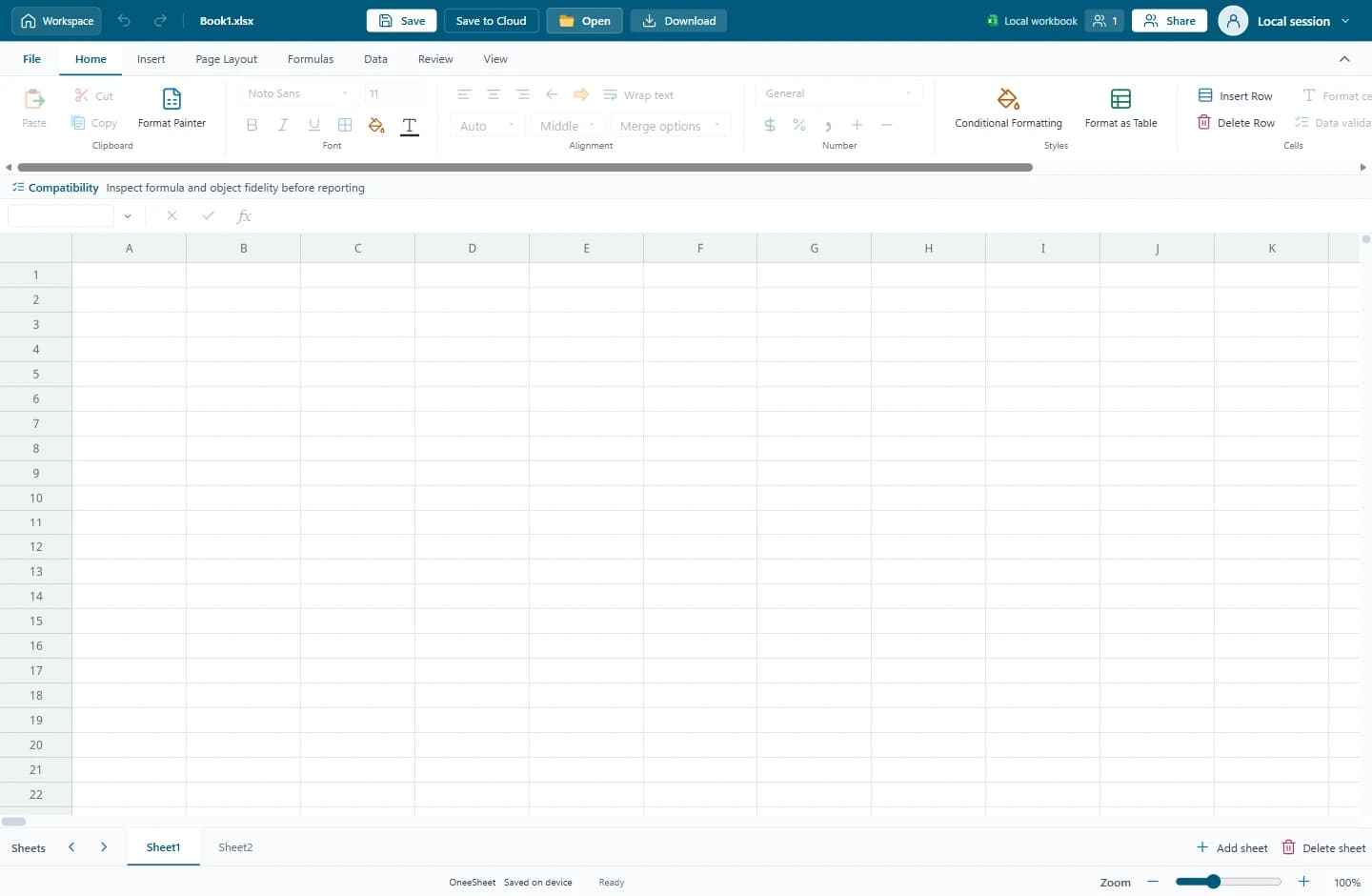
Actual OneeSheet public local editor with an empty workbook; no customer or account data is shown.
Built for

Finance and accounting teams

Businesses working with operational spreadsheets

Teams preparing shared reports

Organizations needing local and connected workbook workflows

PRODUCT FEATURES

What you can do with the system.

Explore the features of OneeSheet and the work they help you do.

01

Workbook and calculation engine

A sparse workbook model and dependency graph connect formulas across sheets. Calculation runs in a C# WebAssembly worker, separately from the browser interface.

  • Cross-sheet references and formula dependencies
  • Financial, lookup and dynamic-array functions
  • Tables and structured references
  • Cycle detection and explicit formula errors
02

Editing and analytical workspace

A canvas-based worksheet supports familiar spreadsheet interaction alongside analysis tools that turn raw rows into navigable reports.

  • Formatting, validation, sorting and filtering
  • Pivot reports, slicers and charts
  • Conditional formatting and formula inspection
  • Goal Seek and scenario previews
03

XLSX, CSV and reporting

Import and export workflows preserve supported workbook features and expose compatibility limits before a file is used for reporting.

  • XLSX import and export
  • Compatibility Inspector for editable and preserved features
  • CSV and TSV data workflows
  • PDF output and printing
04

Collaboration and recovery

SignalR collaboration connects shared edits to server-owned workbook state. Local device checkpoints retain a working copy and pending edits across interruptions.

  • Owner, editor and viewer access
  • Stored device checkpoints and edit journals
  • Ordered synchronization and reconnect
  • Server-side durable journals and checksummed recovery work
05

Reusable data connections

Development includes explicit preview and publication of CSV and HTTPS API data, with reusable transformation definitions and refresh receipts.

  • Clean, rename, filter and type columns
  • Join, append and unpivot workbook data
  • Review a preview before publication
  • Persisted definitions and source/output provenance
06

Financial review and posting

Review-oriented engineering connects approvals to the figures reviewed, and introduces managed invoice and credit posting with protected records.

  • Prepared, reviewed and approved workflow
  • Preserved approval figures and divergence comparison
  • Invoice and credit snapshots with stock movements
  • Category and date-based tax rules requiring professional review
07

Organization and cloud workspace

Optional Hub infrastructure separates account and permission metadata from workbook cell calculations and connects storage to server-managed access.

  • PostgreSQL identity and document metadata
  • Configured S3 storage and KMS integration
  • Scoped sharing and secure application links
  • Save conflicts, quotas and audit records

BEHIND THE INTERFACE

How the system works.

01

Calculation is a system of dependencies

Editing one cell can affect formulas across a workbook. OneeSheet tracks those dependencies, handles dynamic references and isolates formula errors instead of treating each displayed value as an independent text field.

02

A grid that renders the visible workspace

SkiaSharp rendering and a bounded viewport cache keep the worksheet separate from ordinary page elements. WebAssembly workers own workbook operations; the interface displays the resulting state.

03

Durability before acknowledgement

Our reliability work uses ordered writes, checksummed edit journals and controlled recovery. Duplicate and interrupted operations need to retain their identity so reconnecting does not create a second business action.

04

Reviewed figures should stay reviewable

Approval records preserve the exact typed values and source context reviewed. The live workbook can change through other inputs; comparison makes that divergence visible. Integrity hashes are application controls, not external digital signatures.

05

Compatibility has to be demonstrated

Import preservation, editable features and calculation support are different capabilities. The Compatibility Inspector explains these distinctions; full Microsoft Excel parity and independent numerical certification are not claimed.

FROM SETUP TO EVERYDAY USE

Getting started with your team.

01

Choose local or connected work

Open the public local editor for device-based work, or sign in to a configured organization workspace for stored files and sharing.

02

Build and check the workbook

Import or create the sheets, confirm formulas and compatibility, then prepare data, reports and review steps around the actual business task.

03

Connect the operating workflow

Scope sharing, source refresh, financial controls and recovery with the organization. Confirm the modules enabled in the deployed workspace.

IMPORTANT DETAILS

Availability and important details.

  • The public site exposes a web workspace and local editor. Advanced capabilities described from the development source need confirmation in your deployed environment.
  • Full Excel parity, macro execution and regulatory or numerical certification are not claimed. Use the Compatibility Inspector and validate critical workbooks.
  • Financial and tax workflows require professional review of actual rules and applicability; sample rules are illustrative development fixtures.
  • Windows desktop engineering exists in the source, but desktop packaging is paused and public desktop distribution is not promised.

STRAIGHT ANSWERS

Common questions.

Can I use OneeSheet without a company account?

The public site offers a local editor as well as sign-in. Local work is device-based; organizational storage and sharing require a configured account and workspace.

Is OneeSheet a complete replacement for every Excel workbook?

No universal compatibility claim is made. Supported features, preserved package parts and unsupported formulas are distinguished by the Compatibility Inspector. Validate the specific workbook and reporting requirements.

How does OneeSheet connect to Oneewaee’s other products?

The public sign-in page supports secure links from OneeCRM and Oneemail. Integration behavior depends on the configured application and organization; private account content is not exposed by the company website.

What is Oneewaee researching in this platform?

Our work includes calculation fidelity, durable synchronization, bounded rendering, workbook recovery, data provenance and preserved financial approvals. The research and development page explains the methods and remaining validation work.

EXPLORE THE IMPLEMENTATION

Explore the product and its implementation.

Capabilities are described from the product documentation and implementation work. Availability and enabled modules depend on your setup.

NEXT STEP

Talk to us about OneeSheet.

Tell us about your team and the work you want to improve. We can discuss how OneeSheet would be set up, which parts fit your organization and what a sensible first step looks like.

THE ONEEWAEE PRODUCT FAMILY

Keep exploring.